

Permissions and Model Access
Control which models and permission modes your organization and teams can use, how the platform screens prompts and redacts sensitive data, and what usage data the agent reports.
The Permissions and model access page in the Kimchi console is where organization admins set policy for the Kimchi Coding agent. The policy controls which models and permission modes members can work with. It also decides how the platform screens prompts, redacts sensitive data, and reports usage back to Kimchi.
Open Governance → Permissions. The page has Organization, Teams, and Audit tabs; you set policy on the first two.
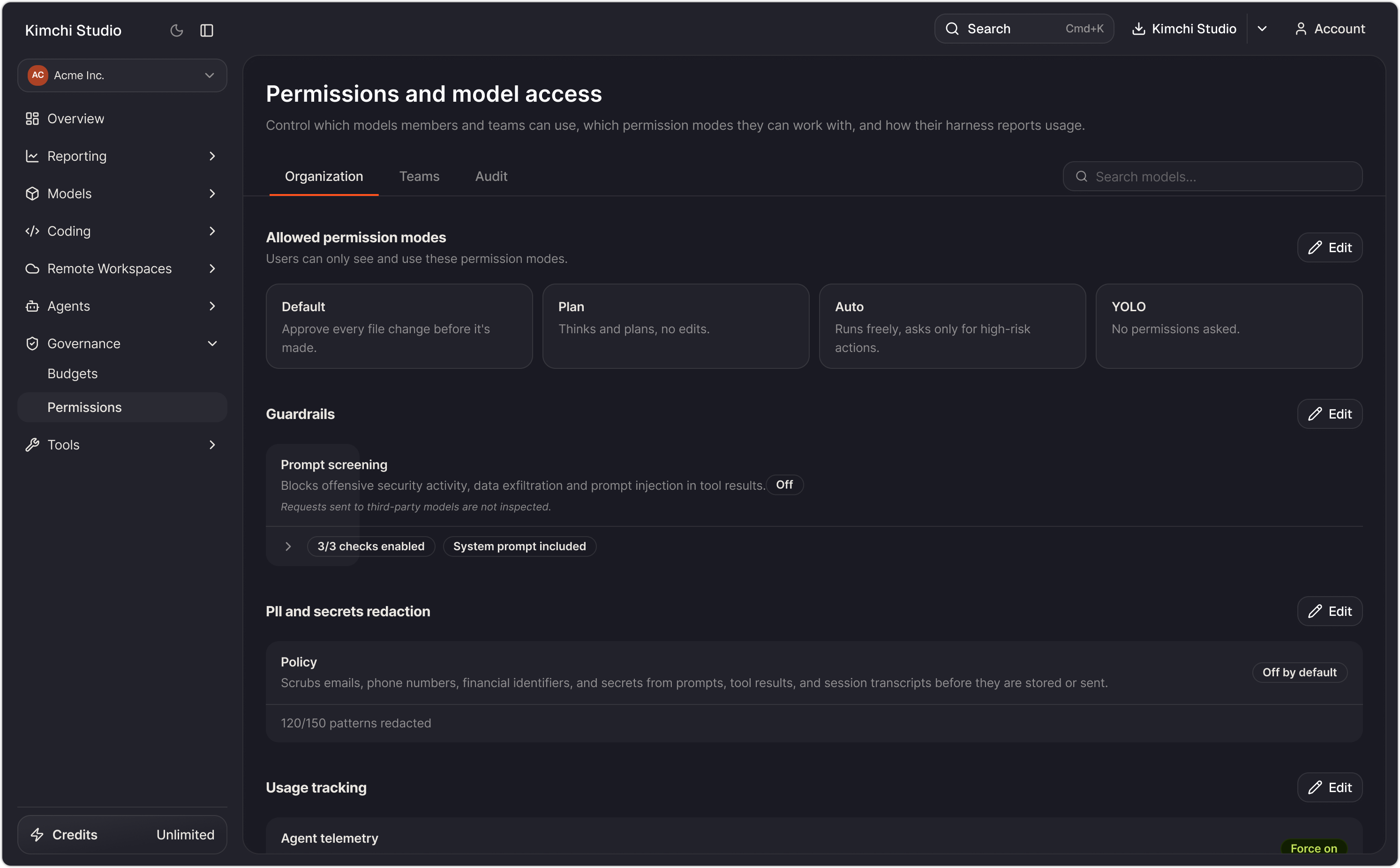
Everything on this page is organization- and team-scoped admin policy. It controls what the Kimchi Coding agent can do for your members, and what usage data the agent sends to Kimchi. See User roles for who can administer these settings.
Allowed models
The Allowed models section controls which models members can see and use. The section lists models in provider groups, covering the integrations your organization connects on External Providers. Kimchi-hosted integrations come first.
Organization rule
By default, the platform allows every model. Blocking a model removes it from the model lists your members see, and the platform rejects calls to a blocked model.
In edit mode, the Allow and Block toggles decide per model, and a provider folder's block-all toggle decides a whole provider.
Hold new models until an admin allows them. When the switch is on, members cannot use a new model until an admin allows it, including models from providers you connect later. Models your organization can already use keep working, and so do newer versions of them.
Turning the switch off and saving releases the pending models; blocked models stay blocked. While the switch is on, the panel counts the models waiting for approval.
Replacement models inherit the access of the model they replace: the panel marks them Replacement, and they work without an admin decision. You can still allow or block them explicitly.
Team exceptions
A team exception can allow a model the organization blocks, or block a model the organization allows. With Inherit organization default on, the team follows the organization rule. With it off, the team can set its own exceptions.
How decisions resolve
- An explicit decision always beats the default. A model listed as both allowed and blocked resolves to blocked.
- A caller's effective rule is the organization rule with the caller's team exceptions applied.
- The team comes from the caller's identity. Callers without a team membership always get the organization rule.
Permission modes
Each member's Kimchi Coding session runs in one of four permission modes. As an admin, you decide which modes members can use. When a scope defines the mode set, sessions can run only in the enabled modes.
| Mode | What the agent does | UI label |
|---|---|---|
default | Approve every file change before it's made | Default |
plan | Thinks and plans, no edits | Plan |
auto | Runs freely, asks only for high-risk actions | Auto |
yolo | No permissions asked | YOLO |
You set policy on the Organization and Teams tabs:
- Organization sets the mode set for the whole organization. Blocking a mode removes it from every member's options, unless a team overrides the set for its own members. See Scope and inheritance.
- Teams sets a per-team mode set. With Inherit organization default on, the team follows the organization-wide set. With it off, the team can set its own. Saving while the toggle is on clears any override the team had.
If no scope sets a mode set, members can use all four modes.
Admins control which modes are available, not the mode a session starts in. Each member picks the starting mode in their own client, for example in Studio settings.
The settings object stores the mode set as kimchiAllowedPermissionModes, with one enabled/disabled toggle per mode. Sessions can run only in the modes the effective policy enables. For example, you can allow default, plan, and auto but block yolo for the whole organization. You can also block auto and yolo for a team that works on sensitive projects.
Guardrails
Guardrails screen prompts before they reach a model. Screening runs at the proxy, so members have no local toggle to turn it off.
Screening covers only the requests the proxy inspects. Requests to third-party models are not inspected, and while the screening model is unavailable for your organization, prompts are not judged.
Prompt screening
Prompt screening is off by default. When on, the platform refuses violating prompts.
| Check | What it catches |
|---|---|
| Offensive security activity | Requests for or attempts at cyberattacks, such as scanning, exploits, malware, or phishing. |
| Data exfiltration | Sending files, secrets, or customer data to a destination the user doesn't control. |
| Tool output injection | Text in tool results that tries to redirect the agent or override its instructions. |
You can turn each check off individually; a check with no explicit setting runs.
By default, the platform also checks text sent as a system prompt. Turning that off lets anyone avoid the checks by labeling text as a system prompt.
With Inherit organization default on, a team follows the organization's screening settings; with it off, the team can set its own.
PII and secrets redaction
PII and secrets redaction scrubs emails, phone numbers, financial identifiers, and secrets from prompts, tool results, and session transcripts. Redaction happens before the platform stores or sends the content.
Redaction policy
| Policy | Effect |
|---|---|
| Off by default (default) | Redaction is off. Members can turn it on with /resources. |
| On by default | Redaction is on. Members can turn it off with /resources. |
| Always on | Always on. Members cannot turn redaction off. |
| Always off | Always off. Members cannot turn redaction on. |
What gets redacted
When redaction is on, each detector either redacts or keeps content readable. The detectors fall into five categories:
| Category | Covers | Without overrides |
|---|---|---|
| Credentials | API keys, tokens, passwords in URLs, and login credentials | Redacted |
| Identity documents | National IDs, passports, and similar document numbers | Readable |
| Person data | Email addresses, names, locations, organizations, and phone numbers | Emails redacted; the rest readable |
| Financial | Credit cards, IBANs, routing and bank account numbers, and cryptocurrency addresses | Cards and IBANs redacted; the rest readable |
| Environment | IP and MAC addresses and local file system paths | Redacted |
You can toggle each detector individually while editing, and reset all overrides back to this set.
Custom entity types are regular expressions with a name and a category. They redact like the built-in detectors, and you can toggle them like any other detector.
With Inherit organization default on, a team follows the organization's redaction settings; with it off, the team can set its own. Saving while the toggle is on clears the team's own settings.
Usage tracking
Usage tracking has two independent policies. You set both per organization and per team, and the agent enforces both when it runs.
Agent telemetry (kimchiUsageReporting)
kimchiUsageReporting)Controls whether the agent sends usage data to Kimchi: sessions, token usage, model spend, and the commit and PR activity behind Productivity.
| Policy | Effect |
|---|---|
| User choice (default) | Each member decides for their own setup. |
| Force on | Telemetry is always sent, regardless of member preference. |
| Force off | Telemetry is never sent. Productivity receives no data from that scope. |
Members choose their own telemetry setting with the CLI (see Getting started):
kimchi config telemetry off   # opt out
kimchi config telemetry       # show the effective setting and any applied policy
Cost to PR attribution (extensions.cost-per-pr)
extensions.cost-per-pr)Controls extensions.cost-per-pr, a resource the agent manages through /resources (see Resource management). When the resource is on, the agent attributes its sessions and model spend to the pull requests it works on.
| Policy | Effect |
|---|---|
| Default on (default) | The resource is on. Members can turn it off with /resources. |
| Default off | The resource is off. Members can turn it on with /resources. |
| Force on | Always attributed. Members cannot turn it off. |
| Force off | Never attributed. Members cannot turn it on. |
Both policies follow the same layout as permission modes: organization-wide on the Organization tab, per team on the Teams tab. Turning Inherit organization default back on makes the team follow the organization policy again.
Editing policies
Open the page
Go to Governance → Permissions in the Kimchi console.
Choose the scope
Select the Organization or Teams tab. To let a team diverge from the organization, switch off Inherit organization default on the Teams tab.
Enter edit mode
Click Edit on the panel you want to change: Allowed models, Allowed permission modes, Guardrails, PII and secrets redaction, or Usage tracking.
Set the policy
Make your changes. Each section of this page describes what its panel controls.
Save
Click Save changes. A toast confirms the save, for example "Usage tracking saved". Cancel reverts your changes.
Scope and inheritance
Policies resolve most specific first. Precedence, from most to least specific: API key, team, organization. This page sets the organization and team scopes; you manage the API key scope elsewhere.
- An unset value at a scope means the scope inherits from the broader one. When no scope sets a value, the defaults apply. Members can use all modes, telemetry follows the member's choice, and resources keep their client-side defaults.
- A set value at a scope wins over every broader scope. A team that defines its own mode set no longer inherits the organization set for any mode.
- The resources map holds cost-to-PR attribution and the PII redaction switch. It merges as a whole: the most specific scope that sets any entry decides the entire map. The console sends the complete map on every change, so the change keeps entries outside the edit.
- Allowed models has no API-key scope: the organization rule plus team exceptions decide, as described under Allowed models.
Settings API
You can also read and set everything on this page through the public API; the published endpoint references carry the full field and semantics detail. Entry points:
- Settings: organization settings and team settings
- Model access: organization model access and team model access
Related resources
Updated 5 days ago